# What are Annual/Seasonal/Day-of-Week/Time-Based Minimum Stays and Gap Fills, and how do I use them?
> Minimum Night Stays allow you to set the lowest number of nights for a reservation right within Beyond You have the option to set Minimum Night Stays on an
Source: https://support.beyondpricing.com/en_us/what-are-annualseasonal-minimum-stays-and-gap-fills-and-how-do-i-use-them-H1yyPriB_
Last updated: 2026-05-06T05:43:41.741Z
Minimum Night Stays allow you to set the lowest number of nights for a reservation right within Beyond. You have the option to set Minimum Night Stays on an Annual, Seasonal, or Time Based basis.
**Pro tip**: Use 'Gap Fills' to make sure you're maximizing your revenue!
If you have a direct connection to Vrbo you must manage your Minimum Stay Requirements in Beyond. If you have a direct connection to Airbnb, you can choose whether to manage your Minimum Stays in Beyond or Airbnb. To see if Minimum Night Stays are available for your integration, check out our information for your Property Management System.
**In This Article**
[I require a Minimum Stay. Can I still use Beyond?](#minimum-stay-beyond)
[Setting Minimum Night Stays by Season or Event](#season-event) [Minimum Stay by Day of Week](#minimum-dow)
[Time-Based Minimum Stays](#last-minute-minimum)
[Gap Fills](#gapfills)
* * *
##
**I require a Minimum Stay. Can I still use Beyond?**
Our pricing model aims to maximize revenue for each day so you'll know you're making the most from each reservation, no matter the length of stay.
For supported integrations, you can set Annual, Seasonal, and Time-Based Minimum Stays, for your listing directly in the Customize Tab of your listing in Beyond. Keep in mind that more restrictions will likely mean fewer qualified reservations.
Want to know more about the process? Look no further! Check out this video below on how to set up Minimum Stays:
* * *
###
##
## **Setting Minimum Night Stays by Season or Event**
You can set up Minimum Night Stays for certain dates for individual listings in the Calendar or in the Customize Tab of your listing. This is helpful if you would like to set a shorter Minimum Night Stay during the low season, a longer Minimum Night Stay during a 3-day event or holiday, or a different Minimum Night Stay for weekends versus weekdays, for example:
_Taking a look at our listing, we'd like to adjust our Minimum Night Stay to 2 nights for weekends, but keep the 1 Minimum Night Stay for weekdays for July. We can set that up easily in the Calendar:_
__
**What are Minimum Stay Overrides?**
Minimum Stay Overrides are made to work **on top** of existing Seasonal Minimum Stays. With Minimum Stay Overrides, you will have the option to "lock" a Seasonal Minimum Stay.
A locked season will work as an override where the Seasonal Minimum Stay will not be changed until you change it. This means Seasonal Minimum Stay automation like Gap Fills and Time-Based Min Stays will **not** work on locked seasons.
This can be set next to each Seasonal Minimum Stay on the Customize page or when you select dates on the Calendar:

* * *
##
**Minimum Stay by Day of Week**
You can also set an Annual/Seasonal Minimum Stay by Day of Week directly in your Customize tab:

Note that the Annual Minimum Stays by Day of Week will take precedence over the Annual Minimum Stays and days of the week left blank will be set to your Annual Minimum Stay.
The Seasonal Minimum Stay by Days of Week will take precedence over any Annual Minimum Stay and will be **superseded** by Seasonal Minimum Stays, Time-Based Minimum Stays, and Gap Fills.
* * *
###
##
**Time-Based Minimum Stays**
Time-Based Minimum Stays enable you to set a Minimum Stay requirement based on how far away the stay is from the booking date.
**Directional Minimum Stays**
Directional Minimum Stays provide more flexibility that allows for better long-term strategies.
The direction column will allow for customizations using **"within"** or **"after"** options to provide further flexibility.
_For example, taking a look at our listing in Orlando, we have an Annual Minimum Night Stay requirement of 5 nights. As we get closer to the date of stay and we have nights that need to be filled, we are willing to accept bookings of 2 nights. By setting up a Time based Minimum Stay of 2 nights within 14 days Beyond will automatically reduce our Minimum Night Stay requirement to 2 nights for the next 2 weeks:_

_For my listing in Las Vegas, I have an Annual Minimum Night Stay requirement of 2 nights. I live over an hour away and I can't always get to my listing last minute, so I don't like to take bookings for the current and next day. By setting my Last Minute Minimum Stay to 30 nights within 1 day I essentially make my place un-bookable as I rarely have a gap of 30 days in my calendar:_

**Seasonal Time-Based Minimum Stays**
Seasonal Time-Based Minimum Stays will allow you the opportunity to create different time-based minimum stay rules for different seasons.
This will cut down on the manual work of adjusting your customization and minimum stay rules throughout the year to best suit your needs.
For example: In low season you may want to take a 2-night minimum stay within the next week, or during high season you may want to raise it to 3 nights within a week of your peak booking time:
You can find Seasonal Time-Based Minimum stays and all minimum stay settings in your "Customize" tab for your listing(s) under the Minimum Stay section.
The order in which we apply Minimum Stays for each listing is as follows: ****Seasonal Time-Based**** Minimum Stays > ****Time-Based**** Minimum Stays > ****Seasonal**** Minimum Stays > ****Day of Week**** Minimum Stays > ****Annual**** Minimum Stays. ****Gap Fills apply to all Minimum Stays.****
* * *
###
##
**Gap Fills**
Gap Fills apply to all Minimum Stay settings to help you receive extra bookings (and increase revenue!) between longer stays. You can even set a Minimum for Gap Filling if you never want bookings less than X nights.
You can set Gap Fills using Bulk Actions, or right in the Customize Tab under the Minimum Stay section for each listing.
Here's a rundown of Gap Fills, Gap Fill Minimum, and the Flexibility, and how to use them:
* **Reduce Minimum Stay to Fill Gaps****:** Enable Gap Fills to set your Minimum Stay to the size of the gap between reservations or blocked days.
* **Gap Fill Minimum:** This is the smallest gap that you would ever be willing to fill when you have Gap Fills enabled. For example, if you set this to 2 nights and there is a gap of 1 night, that night will not be bookable.
* **Flexibility window:** Adding a flexibility window gives the guest the opportunity to book part of a gap in your calendar. The number of days in the Flexibility Window will be subtraced from the gap size allowing guests to book part of the gap. No matter the size of your Flexibility window, we will never allow a stay below your Gap Fill Minimum.
* For example, if the gap is 5 nights and your flexibility window is set to 2 nights, a guest could book a 3-night stay. If no flexibility window is set, the guest could only book a 5-night stay.
Note that Gap Fills are only available to you if you manage Minimum Night Stays in Beyond.
Beyond will automatically set the Gap Fill to the number of days between the bookings. For example, if there are two reservations with three nights in between, the minimum stay for that period will be reduced to three nights. You can set Gap Fills up in the Customize Tab for each listing or using Bulk Actions to adjust the setting for many listings at once.
_Let's take a look at an example: We've set up a two-night Minimum Stay for our Flat Cabin listing, as well as a few Seasonal Minimum Stays. We'd also like guests to be able to book our place when there are fewer than two nights available between reservations or blocked dates -- no matter the season. Let's enable Gap Fills to make that happen:_

Want to watch a video to understand the process a bit more? Look no further! Check out this video below on how to use Gap fills:
**Changeover Days** are prioritized over Gap Fills, however, if you use Escapia, Track, Hostaway, Vrbo, Booking.com, Secra or iPro you have the option to apply **Changeover Day Gap Fills**. Gap Fills for changeover days automatically adjust changeover days/check-in day restrictions to fill gaps.
You can enable Changeover Gap Fills to take priority over Gap Fills in the Customize Tab of your listing:

**What are Seasonal Gap Fills?**
This feature allows you to define the **seasons** where you would like to apply specific gap rules or where you do **not** want gaps to be filled at all.
You can create a season to cover specific time periods and apply a Gap Fill Minimum and Flexibility Window to that particular season.
For example, let's say you have an **Annual Gap Fill Minimum of 2** with no **Flexibility Window**. But, during Christmas and an event in May, you **do not want any gaps to be filled**. You can set your Customizations to look like this and say "don't fill gaps":

Or another example, let's say you **only want to fill gaps seasonally** September-November before the holiday season. You can set your Gap Fill Minimum and Flexibility Window to only include a Seasonal Gap Fill Minimum and Flexibility Window and keep your Annual Gap Fill Minimum blank:
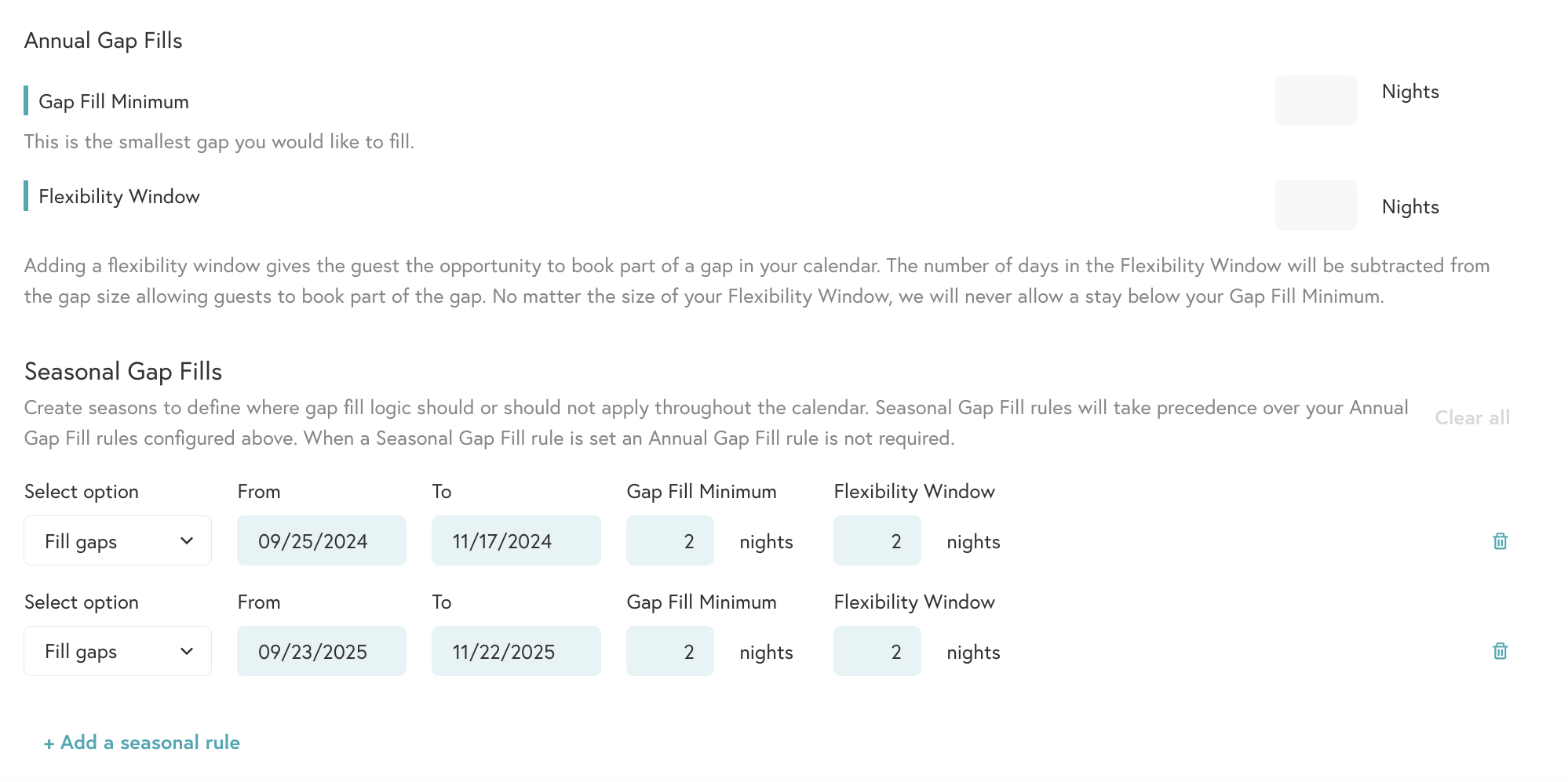
With this feature you have even more options to customize your platform to suit your needs the best!
**What are Time based Gap Fills?**
Time based Gap Fills allow you to define the gap depending upon how far away the gap dates are from today.
Basically this gives you even more flexibilty if you want to set specific rules for gaps that are more immediate on your calendar, without updating the gap for an entire year or season. More control of gap fills = better chance to get more bookings in the short term:

**What are Seasonal Time based Gap Fills?**
Seasonal Time based Gap Fills combine the seasonal control of Seasonal Gap Fills with the lead-time control of Time based Gap Fills. This will allow you to define time based gaps for specific seasons of the year.
This means you can set a Gap fill for a specific time without worrying about it- so you can set it and get back to seeing to your property/listing(s):

If you have questions regarding Minimum Stays or Gap Fills, please reach out to us at [**support@beyondpricing.com**](mailto:support@beyondpricing.com) we're happy to help!